Android SDK
Overview
The Appstack Android SDK lets you:
- Track standardized and custom events
- Track revenue events with currency (for ROAS / optimization)
- Retrieve attribution data automatically (Play Store installs)
Features (with examples)
SDK initialization
import com.appstack.attribution.AppStackAttributionSdk

AppStackAttributionSdk.configure(
    context = this,
    apiKey = "your-android-api-key"
)
Event tracking (standard + custom)
import com.appstack.attribution.EventType

// Standard
AppStackAttributionSdk.sendEvent(EventType.SIGN_UP)

// Custom
AppStackAttributionSdk.sendEvent(
    EventType.CUSTOM,
    name = "level_completed",
    parameters = mapOf("level" to 12)
)
Revenue tracking (recommended for all ad networks)
AppStackAttributionSdk.sendEvent(
    EventType.PURCHASE,
    parameters = mapOf("revenue" to 29.99, "currency" to "EUR")
)
// `price` is also accepted instead of `revenue`
Link to the Maven Central repository
Here, you will find the Maven Central Android SDK documentation. Please, use the latest version of the SDK available.
Requirements
- Minimum SDK: Android 5.0 (API level 21)
- Target SDK: 34+
- Java Version: 8+
- Gradle: 7.0+
Installation
Add the SDK dependency to your app's build.gradle.kts:
dependencies {
    implementation("tech.appstack.android-sdk:appstack-android-sdk:1.2.2")
}
No additional configuration needed - the SDK will work automatically after installation.
Quick Start
1. Initialize in Application
Configure the SDK in your Application class:
import com.appstack.attribution.AppStackAttributionSdk
import com.appstack.attribution.EventType

class MyApplication : Application() {
    override fun onCreate() {
        super.onCreate()

        AppStackAttributionSdk.configure(
            context = this,
            apiKey = "your-android-api-key"
        )
    }
}
2. Track Events
Track user actions and revenue in your activities:
// Track events without parameters
AppStackAttributionSdk.sendEvent(EventType.SIGN_UP)
AppStackAttributionSdk.sendEvent(EventType.LOGIN)

// Track events with parameters (including revenue)
AppStackAttributionSdk.sendEvent(
    EventType.PURCHASE,
    parameters = mapOf("revenue" to 29.99, "currency" to "USD")
)
AppStackAttributionSdk.sendEvent(
    EventType.SUBSCRIBE,
    parameters = mapOf("revenue" to 9.99)
)

// Custom events
AppStackAttributionSdk.sendEvent(
    EventType.CUSTOM,
    name = "level_completed",
    parameters = mapOf("level" to 5)
)
API Reference
configure(context: Context, apiKey: String, ...)
Initializes the SDK with your API key. Must be called in Application.onCreate() before any other SDK methods.
Parameters:
context- Application contextapiKey- Your Android API key from the Appstack dashboardisDebug- Optional debug mode flag (default: false)logLevel- Optional log level configurationendpointBaseUrl- Optional custom endpoint
Example:
AppStackAttributionSdk.configure(
    context = this,
    apiKey = "your-api-key",
    isDebug = BuildConfig.DEBUG,
    logLevel = LogLevel.INFO
)
sendEvent(event: EventType, name: String?, parameters: Map<String, Any>?)
Tracks custom events with optional parameters. Use this for all user actions you want to measure.
Parameters:
event- Event type from EventType enum (required)name- Event name for custom events (optional, required when event is CUSTOM)parameters- Optional map of parameters (e.g.,mapOf("revenue" to 29.99, "currency" to "USD"))
Event Types:
EventType.INSTALL- App installation (tracked automatically)EventType.LOGIN- User loginEventType.SIGN_UP/EventType.REGISTER- User registrationEventType.PURCHASE- Purchase transactionsEventType.SUBSCRIBE- Subscription eventsEventType.ADD_TO_CART,EventType.ADD_TO_WISHLIST,EventType.INITIATE_CHECKOUT- E-commerce eventsEventType.START_TRIAL- Trial startEventType.LEVEL_START,EventType.LEVEL_COMPLETE- Game progressionEventType.TUTORIAL_COMPLETE,EventType.SEARCH,EventType.VIEW_ITEM,EventType.VIEW_CONTENT,EventType.SHARE- Engagement eventsEventType.CUSTOM- For any other custom events
Examples:
// User registration
AppStackAttributionSdk.sendEvent(EventType.SIGN_UP)

// Game progression with custom data
AppStackAttributionSdk.sendEvent(
    EventType.CUSTOM,
    name = "level_completed",
    parameters = mapOf("level" to 5, "score" to 1000)
)

// Premium purchase with revenue
AppStackAttributionSdk.sendEvent(
    EventType.PURCHASE,
    parameters = mapOf("revenue" to 29.99, "currency" to "USD", "product_id" to "premium")
)

// Monthly subscription
AppStackAttributionSdk.sendEvent(
    EventType.SUBSCRIBE,
    parameters = mapOf("revenue" to 9.99, "plan" to "monthly")
)
showDebugOverlay(activity: Activity) (Debug only)
Shows debug overlay with SDK status and event information. Only works when isDebug = true.
Example:
if (BuildConfig.DEBUG) {
    AppStackAttributionSdk.showDebugOverlay(this)
}
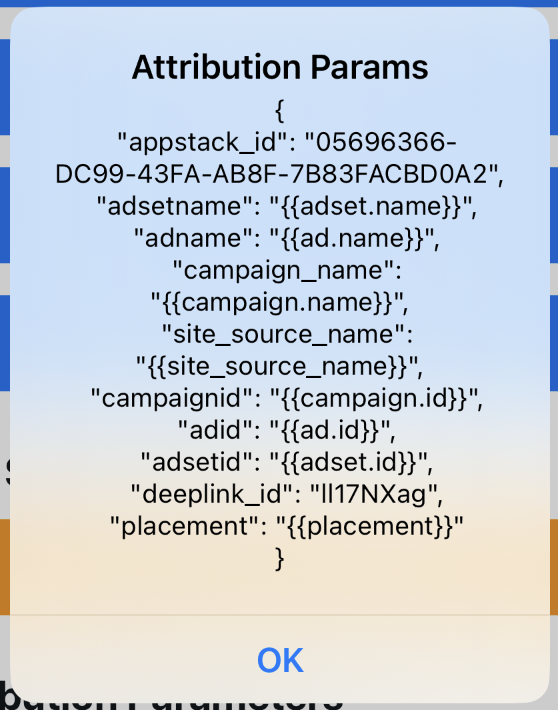
getAttributionParams(): Map<String, Any>
Retrieve attribution parameters from the SDK. This returns all available attribution data that the SDK has collected.
Returns: A map containing attribution parameters (key-value pairs).
Returns data on success: Map with various attribution-related data depending on availability.
Returns empty map: emptyMap() if no attribution parameters are available.
Example:
val attributionParams = AppStackAttributionSdk.getAttributionParams()
println("Attribution parameters: $attributionParams")

// Example output (varies by device / store install):
// {
//   "appstack_id": "05696366-DC99-43FA-AB8F-7B83FACBD0A2",
//   "adsetname": "{{adset.name}}",
//   "adname": "{{ad.name}}",
//   "campaign_name": "{{campaign.name}}",
//   "site_source_name": "{{site_source_name}}",
//   "campaignid": "{{campaign.id}}",
//   "adid": "{{ad.id}}",
//   "adsetid": "{{adset.id}}",
//   "deeplink_id": "II17NXag",
//   "placement": "{{placement}}"
// }
Use Cases:
- Retrieve attribution data for analytics
- Check if the app was attributed to a specific campaign
- Log attribution parameters for debugging
- Send attribution data to your backend server
- Analyze user acquisition sources
Advanced Configuration
Security Best Practices
API Key Protection:
- Never commit API keys to version control
- Store API keys in
gradle.propertiesor secure build configuration - Use different keys for debug/release builds
// ✅ Good - Use BuildConfig or gradle properties
AppStackAttributionSdk.configure(
    context = this,
    apiKey = BuildConfig.APPSTACK_API_KEY
)

// ❌ Avoid - Hardcoded keys in source code
AppStackAttributionSdk.configure(
    context = this,
    apiKey = "ak_live_1234567890abcdef" // DON'T DO THIS
)
ProGuard/R8
The SDK includes built-in keep rules for obfuscation. No additional ProGuard configuration is needed.
Debug Mode
Enable debug mode during development to see detailed logs and use the debug overlay:
AppStackAttributionSdk.configure(
    context = this,
    apiKey = "your-api-key",
    isDebug = BuildConfig.DEBUG,
    logLevel = LogLevel.VERBOSE
)
Attribution Features
Install Attribution
- Install referrer data is collected automatically for Play Store installs
- Attribution data appears immediately for Play Store installations
- Install events are sent automatically on first app launch
Event Tracking
- Event names are case-sensitive and use the provided
EventTypeenum - Revenue values should be in USD
- Events are queued locally if network is unavailable and sent when connectivity returns
Limitations
Platform Constraints
- Android 5.0+ required (API level 21)
- Attribution only works for Play Store installations
- Network connectivity required for event transmission (with offline queueing)
Event Tracking
- SDK must be initialized in
Application.onCreate()before tracking calls - Custom event names should be descriptive and consistent
- Debug overlay only available when
isDebug = true
EAC recommendations
Revenue events (all ad networks)
For any event that represents revenue, we recommend sending:
revenueorprice(number)currency(string, e.g.EUR,USD)
AppStackAttributionSdk.sendEvent(
    EventType.PURCHASE,
    parameters = mapOf("revenue" to 4.99, "currency" to "EUR")
)
Meta matching (send once per installation, as early as possible)
To improve matching quality on Meta, send events including the following parameters if you can fullfill them:
emailname(first + last name in the same field)phone_numberdate_of_birth(recommended format:YYYY-MM-DD)
Support
For questions or issues:
- Check the GitHub Repository
- Contact our support team
- Open an issue in the repository