iOS SDK
Overview
The Appstack iOS SDK lets you:
- Track standardized and custom events
- Track revenue events with currency (for ROAS / optimization)
- Enable Apple Ads attribution
- Retrieve the Appstack installation ID and attribution parameters
Features (with examples)
SDK initialization
import AppstackSDK

AppstackAttributionSdk.shared.configure(
    apiKey: "your_api_key",
    isDebug: false,
    endpointBaseUrl: nil,
    logLevel: .info
)
Event tracking (standard + custom)
// Standard
AppstackAttributionSdk.shared.sendEvent(event: .SIGN_UP)

// Custom
AppstackAttributionSdk.shared.sendEvent(
    event: .CUSTOM,
    name: "level_completed",
    parameters: ["level": 12]
)
Revenue tracking (recommended for all ad networks)
AppstackAttributionSdk.shared.sendEvent(
    event: .PURCHASE,
    parameters: ["revenue": 29.99, "currency": "EUR"]
)
// `price` is also accepted instead of `revenue`
Installation ID + attribution parameters
let appstackId = AppstackAttributionSdk.shared.getAppstackId()
let attributionParams = AppstackAttributionSdk.shared.getAttributionParams()
getAttributionParams() -> [String: Any]
Retrieve attribution parameters from the SDK. This returns all available attribution data that the SDK has collected.
Returns: A dictionary containing attribution parameters (key-value pairs).
Returns data on success: Dictionary with various attribution-related data depending on availability.
Returns empty dictionary: [:] if no attribution parameters are available.
Example:
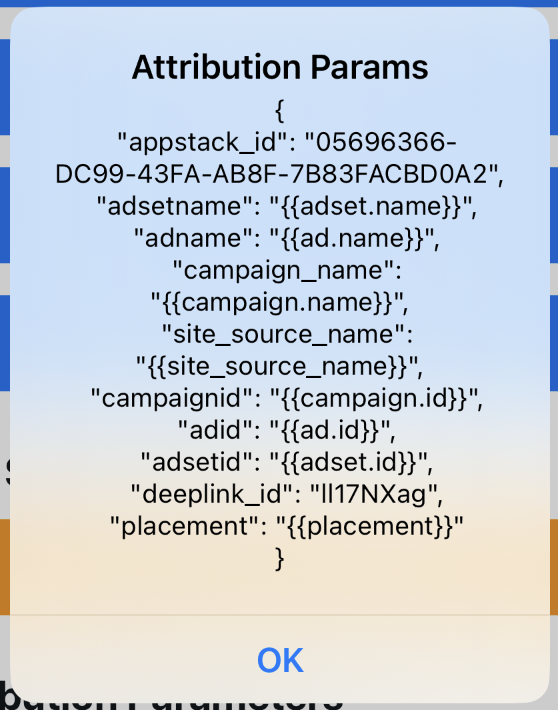
let attributionParams = AppstackAttributionSdk.shared.getAttributionParams()
print("Attribution parameters:", attributionParams)

// Example output (varies by device / store install):
// [
//   "appstack_id": "05696366-DC99-43FA-AB8F-7B83FACBD0A2",
//   "adsetname": "{{adset.name}}",
//   "adname": "{{ad.name}}",
//   "campaign_name": "{{campaign.name}}",
//   "site_source_name": "{{site_source_name}}",
//   "campaignid": "{{campaign.id}}",
//   "adid": "{{ad.id}}",
//   "adsetid": "{{adset.id}}",
//   "deeplink_id": "II17NXag",
//   "placement": "{{placement}}"
// ]
Use Cases:
- Retrieve attribution data for analytics
- Check if the app was attributed to a specific campaign
- Log attribution parameters for debugging
- Send attribution data to your backend server
- Analyze user acquisition sources
Apple Ads attribution
import AppstackSDK

if #available(iOS 14.3, *) {
    AppstackASAAttribution.shared.enableAppleAdsAttribution()
}
Link to the GitHub repository
Here, you will find the GitHub iOS Appstack SDK documentation. Please, use the latest version of the SDK available.
Requirements
- iOS 13.0+
- Xcode 14.0+
- Swift 5.0+
Installation
Swift Package Manager
You can install the SDK via Swift Package Manager (SPM) by adding the following dependency to your Package.swift file:
dependencies: [
    .package(url: "https://github.com/appstack-tech/ios-appstack-sdk.git", from: "3.1.2")
]
Or directly from Xcode:
- Go to File > Add Packages
- Enter the repository URL:
https://github.com/appstack-tech/ios-appstack-sdk.git - Select the desired version and click Add Package
Initial Setup
Before using the SDK, configure the attribution endpoint using one of the following methods:
Option 1: Through Info.plist
Add the following entry to your Info.plist file:
<key>NSAdvertisingAttributionReportEndpoint</key>
<string>https://ios-appstack.com/</string>
Option 2: Through Xcode
- Open your
Info.plistfile - Add a new entry with the key: Advertising attribution report endpoint URL
- Set the value to:
https://ios-appstack.com/
Initialization
AppDelegate
import AppstackSDK

@main
class AppDelegate: UIResponder, UIApplicationDelegate {
    func application(_ application: UIApplication, didFinishLaunchingWithOptions launchOptions: [UIApplication.LaunchOptionsKey: Any]?) -> Bool {
        // Configure Appstack SDK v2.1.0+
        AppstackAttributionSdk.shared.configure(
            apiKey: "your_api_key",
            isDebug: false,  // Set to true for development
            endpointBaseUrl: nil,  // Use default endpoint
            logLevel: .info  // Set log level
        )
        return true
    }
}
SceneDelegate
import AppstackSDK

class SceneDelegate: UIResponder, UIWindowSceneDelegate {
    func scene(_ scene: UIScene, willConnectTo session: UISceneSession, options connectionOptions: UIScene.ConnectionOptions) {
        AppstackAttributionSdk.shared.configure(
            apiKey: "your_api_key",
            isDebug: false,
            endpointBaseUrl: nil,
            logLevel: .info
        )
    }
}
SwiftUI
import SwiftUI
import AppstackSDK

@main
struct MyApp: App {
    init() {
        AppstackAttributionSdk.shared.configure(
            apiKey: "your_api_key",
            isDebug: false,
            endpointBaseUrl: nil,
            logLevel: .info
        )
    }

    var body: some Scene {
        WindowGroup {
            ContentView()
        }
    }
}
Sending Events
Using EventType Enum
The SDK provides better type safety with predefined event types:
// Standard events using EventType enum
AppstackAttributionSdk.shared.sendEvent(event: .LOGIN)
AppstackAttributionSdk.shared.sendEvent(event: .PURCHASE, parameters: ["revenue": 29.99])
AppstackAttributionSdk.shared.sendEvent(event: .SUBSCRIBE, parameters: ["revenue": 9.99])

// Custom events
AppstackAttributionSdk.shared.sendEvent(
    event: .CUSTOM,
    name: "user_registered"
)
AppstackAttributionSdk.shared.sendEvent(
    event: .CUSTOM,
    name: "purchase_completed",
    parameters: ["revenue": 49.99]
)
Available EventType Values
public enum EventType: String {
    // Lifecycle
    case INSTALL

    // Authentication & account
    case LOGIN
    case SIGN_UP
    case REGISTER

    // Monetization
    case PURCHASE
    case ADD_TO_CART
    case ADD_TO_WISHLIST
    case INITIATE_CHECKOUT
    case START_TRIAL
    case SUBSCRIBE

    // Games / progression
    case LEVEL_START
    case LEVEL_COMPLETE

    // Engagement
    case TUTORIAL_COMPLETE
    case SEARCH
    case VIEW_ITEM
    case VIEW_CONTENT
    case SHARE

    // Catch-all
    case CUSTOM  // For custom events
}
Revenue Range Matching
The SDK automatically matches events with revenue parameters to configured revenue ranges in the Appstack platform:
- Events are tracked with their revenue values
- The SDK evaluates if the revenue falls within the configured ranges
- Conversion values are triggered when revenue requirements are met
- Multiple events can contribute to the same conversion value
Important Notes
- Always initialize the SDK before sending events
- Event names must match those defined in the Appstack platform
- Parameters are passed as a dictionary
[String: Any]and can include any key-value pairs (e.g., revenue, currency, quantity) - Revenue parameters support automatic type conversion (
Double,Int,Float,String) - Revenue ranges are configured in the Appstack platform and automatically synchronized
Configuration Parameters
The AppstackAttributionSdk.shared.configure() method supports the following parameters:
apiKey(String, required): Your Appstack API keyisDebug(Bool, default: false): Iftrue, uses development URL automaticallyendpointBaseUrl(String?, default: nil): Custom endpoint URL (optional)logLevel(LogLevel, default: .info): Logging level for debugging
Configuration Examples
// Development configuration
AppstackAttributionSdk.shared.configure(
    apiKey: "your_api_key",
    isDebug: true,  // Uses https://api.event.dev.appstack.tech
    endpointBaseUrl: nil,
    logLevel: .debug
)

// Production configuration
AppstackAttributionSdk.shared.configure(
    apiKey: "your_api_key",
    isDebug: false,  // Uses production URL
    endpointBaseUrl: nil,
    logLevel: .info
)

// Custom endpoint configuration
AppstackAttributionSdk.shared.configure(
    apiKey: "your_api_key",
    isDebug: false,
    endpointBaseUrl: "https://your-custom-endpoint.com",
    logLevel: .warning
)
Apple Search Ads Attribution
Compatibility
- Requires iOS 14.3+
- Works with AppstackSDK version 2.1.0 or later
Attribution Data Collection
Apple Search Ads attribution is a two-step process:
- Collect the user's attribution token and send it to Appstack
- Appstack requests attribution data from Apple within 24 hours
Standard vs. Detailed Attribution
| Data Type | Requires ATT Consent |
|---|---|
| Standard | No |
| Detailed | Yes |
Standard Attribution (No User Consent Required)
import AppstackSDK

if #available(iOS 14.3, *) {
    AppstackASAAttribution.shared.enableAppleAdsAttribution()
}
Detailed Attribution (Requires User Consent)
import AppTrackingTransparency
import AppstackSDK

if #available(iOS 14.3, *) {
    ATTrackingManager.requestTrackingAuthorization { status in
        // Enable ASA Attribution after getting permission
        AppstackASAAttribution.shared.enableAppleAdsAttribution()

        switch status {
        case .authorized:
            // User allowed tracking - detailed attribution available
            print("ATTrackingManager: Authorized")
        case .denied, .restricted, .notDetermined:
            // User denied tracking - standard attribution still works
            print("ATTrackingManager: Not authorized")
        @unknown default:
            break
        }
    }
}
Complete Implementation Example
import UIKit
import AppTrackingTransparency
import AppstackSDK

@main
class AppDelegate: UIResponder, UIApplicationDelegate {
    func application(_ application: UIApplication, didFinishLaunchingWithOptions launchOptions: [UIApplication.LaunchOptionsKey: Any]?) -> Bool {
        // Configure Appstack SDK v2.1.0+
        AppstackAttributionSdk.shared.configure(
            apiKey: "your_api_key",
            isDebug: false,  // Set to true for development
            endpointBaseUrl: nil,
            logLevel: .info
        )

        // Request tracking permission and enable ASA Attribution
        if #available(iOS 14.3, *) {
            ATTrackingManager.requestTrackingAuthorization { status in
                AppstackASAAttribution.shared.enableAppleAdsAttribution()
            }
        }

        return true
    }
}
⚠️ Important Notes:
- Detailed attribution requires user consent
- Standard attribution works even if the user denies tracking
- Attribution data may take up to 24 hours to appear in the Appstack dashboard
- iOS 14.3+: Implement ATT permission request before enabling ASA tracking
Advanced Configuration
SDK Behavior
The SDK automatically:
- Fetches configuration from Appstack servers
- Manages conversion value updates based on event tracking
- Handles revenue range matching for conversion optimization
- Processes events in time-based windows (0-2 days, 3-7 days, 8-35 days)
- Queues events when configuration is not ready
Event Processing
- Events are processed asynchronously to avoid blocking the main thread
- The SDK queues events if configuration is not yet loaded
- Revenue parameters are automatically validated and converted to numeric values
- Events are matched against configured revenue ranges in real-time
EAC recommendations
Revenue events (all ad networks)
For any event that represents revenue, we recommend sending:
revenueorprice(number)currency(string, e.g.EUR,USD)
AppstackAttributionSdk.shared.sendEvent(
    event: .PURCHASE,
    parameters: ["revenue": 4.99, "currency": "EUR"]
)
Meta matching (send once per installation, as early as possible)
To improve matching quality on Meta, send events including the following parameters if you can fullfill them:
emailname(first + last name in the same field)phone_numberdate_of_birth(recommended format:YYYY-MM-DD)
## Support

For any questions or issues, please:

- **Open an issue** in the [GitHub repository](https://github.com/appstack-tech/ios-appstack-sdk)
- Contact our **support team** for further assistance

📩 **[Contact](https://www.appstack.tech/contact)**