Flutter SDK
Overview
The Appstack Flutter SDK lets you:
- Track standardized and custom events
- Track revenue events with currency (for ROAS / optimization)
- Enable Apple Ads attribution on iOS
- Retrieve the Appstack installation ID and attribution parameters
Features (with examples)
SDK initialization
import 'dart:io' show Platform;
import 'package:appstack_plugin/appstack_plugin.dart';

final apiKey = Platform.isIOS ? 'your-ios-api-key' : 'your-android-api-key';
await AppstackPlugin.configure(apiKey);
Event tracking (standard + custom)
// Standard
await AppstackPlugin.sendEvent(EventType.signUp);

// Custom
await AppstackPlugin.sendEvent(
  EventType.custom,
  eventName: 'level_completed',
  parameters: {'level': 12},
);
Revenue tracking (recommended for all ad networks)
await AppstackPlugin.sendEvent(
  EventType.purchase,
  parameters: {'revenue': 29.99, 'currency': 'EUR'},
);
// `price` is also accepted instead of `revenue`
Installation ID + attribution parameters
final appstackId = await AppstackPlugin.getAppstackId();
final attributionParams = await AppstackPlugin.getAttributionParams();
Apple Ads attribution (iOS)
import 'dart:io' show Platform;

if (Platform.isIOS) {
  await AppstackPlugin.enableAppleAdsAttribution();
}
Link to the pub.dev repository
Here, you will find the pub.dev appstack_plugin documentation. Please, use the latest version of the SDK available.
Requirements
iOS
- iOS version: 14.3+ (recommended for Apple Ads)
- Xcode: 14.0+
Android
- Minimum SDK: Android 5.0 (API level 21)
- Target SDK: 34+
General
- Flutter: 3.3.0+
- Dart: 2.18.0+
Installation
Add to your pubspec.yaml:
dependencies:
  appstack_plugin: ^1.2.0
Then run:
flutter pub get
Platform Configuration
iOS Configuration
Add to ios/Runner/Info.plist:
<key>NSAdvertisingAttributionReportEndpoint</key>
<string>https://ios-appstack.com/</string>
Run pod install:
cd ios && pod install
Note: The iOS AppstackSDK.xcframework is bundled with the plugin - no additional dependencies needed.
Android Configuration
Add the repository to your android/build.gradle:
allprojects {
    repositories {
        google()
        mavenCentral()
        maven { url 'https://jitpack.io' }
    }
}
No additional configuration needed for Android - the SDK will work automatically after installation.
Quick Start
import 'package:flutter/material.dart';
import 'package:appstack_plugin/appstack_plugin.dart';
import 'dart:io' show Platform;

void main() async {
  WidgetsFlutterBinding.ensureInitialized();

  // Configure the SDK
  final apiKey = Platform.isIOS
      ? 'your-ios-api-key'
      : 'your-android-api-key';

  await AppstackPlugin.configure(apiKey);

  // Enable Apple Ads attribution on iOS
  if (Platform.isIOS) {
    await AppstackPlugin.enableAppleAdsAttribution();
  }

  runApp(MyApp());
}

class MyApp extends StatelessWidget {
  void trackPurchase() {
    AppstackPlugin.sendEvent(
      EventType.purchase,
      parameters: {'revenue': 29.99, 'currency': 'USD'}
    );
  }

  @override
  Widget build(BuildContext context) {
    // ... your app
  }
}
API Reference
configure(String apiKey, ...): Future<bool>
Initializes the SDK with your API key. Must be called before any other SDK methods.
Parameters:
apiKey- Your platform-specific API key from the Appstack dashboardisDebug- Optional debug mode flag (default: false)endpointBaseUrl- Optional custom endpointlogLevel- Optional log level: 0=DEBUG, 1=INFO, 2=WARN, 3=ERROR (default: 1)
Returns: Future that resolves to true if configuration was successful
Example:
final success = await AppstackPlugin.configure('your-api-key-here');
if (!success) {
  print('SDK configuration failed');
}

// With all parameters
await AppstackPlugin.configure(
  'your-api-key-here',
  isDebug: true,
  logLevel: 0, // DEBUG
);
sendEvent(EventType eventType, {String? eventName, Map<String, dynamic>? parameters}): Future<bool>
Tracks custom events with optional parameters. Use this for all user actions you want to measure.
Parameters:
eventType- Event type from the EventType enum (required)eventName- Event name for custom events (optional, required when eventType is custom)parameters- Optional map of parameters (e.g.,{'revenue': 29.99, 'currency': 'USD'})
Returns: Future that resolves to true if event was sent successfully
Event Types:
EventType.install- App installation (tracked automatically)EventType.login,EventType.signUp,EventType.register- AuthenticationEventType.purchase,EventType.addToCart,EventType.addToWishlist,EventType.initiateCheckout,EventType.startTrial,EventType.subscribe- MonetizationEventType.levelStart,EventType.levelComplete- Game progressionEventType.tutorialComplete,EventType.search,EventType.viewItem,EventType.viewContent,EventType.share- EngagementEventType.custom- For application-specific events
Examples:
// Track events without parameters
await AppstackPlugin.sendEvent(EventType.signUp);
await AppstackPlugin.sendEvent(EventType.levelComplete);

// Track events with parameters (including revenue)
await AppstackPlugin.sendEvent(
  EventType.purchase,
  parameters: {'revenue': 29.99, 'currency': 'USD'}
);
await AppstackPlugin.sendEvent(
  EventType.subscribe,
  parameters: {'revenue': 9.99, 'plan': 'monthly'}
);

// Custom events
await AppstackPlugin.sendEvent(
  EventType.custom,
  eventName: 'user_completed_tutorial',
  parameters: {'level': 5, 'score': 1000}
);
enableAppleAdsAttribution(): Future<bool> (iOS only)
Enables Apple Ads attribution tracking. Call this after configure() on iOS and the ATT to track App Store install sources.
Returns: Future that resolves to true if attribution was enabled successfully
Requirements:
- iOS 14.3+
- App installed from App Store or TestFlight
- Attribution data appears within 24-48 hours
Example:
import 'dart:io' show Platform;

if (Platform.isIOS) {
  await AppstackPlugin.enableAppleAdsAttribution();
}
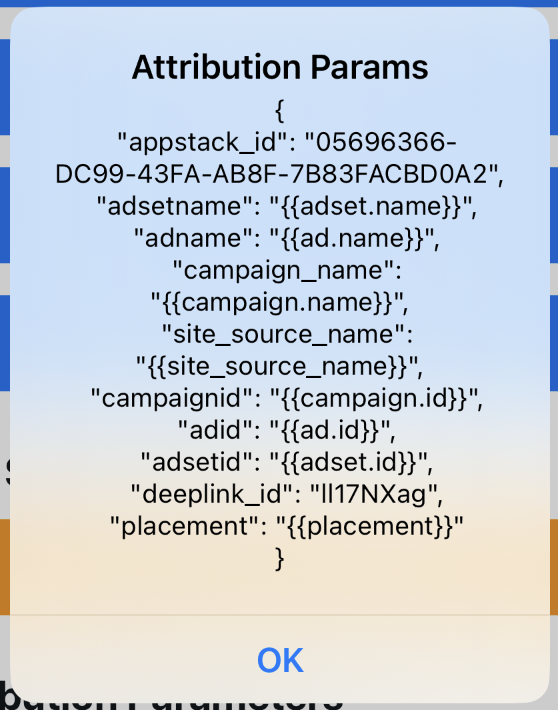
getAttributionParams(): Future<Map<String, dynamic>?>
Retrieve attribution parameters from the SDK. This returns all available attribution data that the SDK has collected.
Returns: Future that resolves to a map containing attribution parameters (key-value pairs), or null if not available yet
Example:
final attributionParams = await AppstackPlugin.getAttributionParams();
print('Attribution parameters: $attributionParams');

// Example output (varies by platform):
// {
//   "appstack_id": "05696366-DC99-43FA-AB8F-7B83FACBD0A2",
//   "adsetname": "{{adset.name}}",
//   "adname": "{{ad.name}}",
//   "campaign_name": "{{campaign.name}}",
//   "site_source_name": "{{site_source_name}}",
//   "campaignid": "{{campaign.id}}",
//   "adid": "{{ad.id}}",
//   "adsetid": "{{adset.id}}",
//   "deeplink_id": "II17NXag",
//   "placement": "{{placement}}"
// }
Use Cases:
- Retrieve attribution data for analytics
- Check if the app was attributed to a specific campaign
- Log attribution parameters for debugging
- Send attribution data to your backend server
- Analyze user acquisition sources
Advanced Configuration
Environment-based Configuration
Set up different API keys for different environments:
// Use environment variables or configuration
final apiKey = Platform.isIOS
    ? const String.fromEnvironment('APPSTACK_IOS_API_KEY')
    : const String.fromEnvironment('APPSTACK_ANDROID_API_KEY');

await AppstackPlugin.configure(apiKey);
Security Best Practices
API Key Protection:
- Never commit API keys to version control
- Use environment variables or secure configuration
- Use different keys for development and production
// ✅ Good - Use environment variables
final apiKey = const String.fromEnvironment('APPSTACK_API_KEY');

// ❌ Avoid - Hardcoded keys
final apiKey = "ak_live_1234567890abcdef"; // DON'T DO THIS
Error Handling
Future<void> trackUserAction(EventType eventType, {double? revenue, String? currency}) async {
  try {
    final params = <String, dynamic>{};
    if (revenue != null) params['revenue'] = revenue;
    if (currency != null) params['currency'] = currency;
    final success = await AppstackPlugin.sendEvent(eventType, parameters: params.isEmpty ? null : params);
    if (!success) {
      print('Failed to track event: $eventType');
    }
  } catch (error) {
    print('SDK Error: $error');
  }
}
Common Event Patterns
// E-commerce events
Future<void> trackPurchase(String productId, double price) async {
  await AppstackPlugin.sendEvent(
    EventType.purchase,
    parameters: {'revenue': price, 'product_id': productId, 'currency': 'USD'}
  );
}

// User lifecycle events
Future<void> trackUserRegistration() async {
  await AppstackPlugin.sendEvent(EventType.signUp);
}

// Game progression
Future<void> trackLevelComplete(int level) async {
  await AppstackPlugin.sendEvent(
    EventType.custom,
    eventName: 'level_${level}_completed',
    parameters: {'level': level}
  );
}
Attribution Features
iOS - Apple Ads Attribution
- Only works on iOS 14.3+
- Requires app installation from App Store or TestFlight
- Attribution data appears within 24-48 hours
- User consent may be required for detailed attribution (iOS 14.5+)
if (Platform.isIOS) {
  await AppstackPlugin.enableAppleAdsAttribution();
}
Android - Play Store Attribution
- Install referrer data collected automatically
- Attribution available immediately for Play Store installs
- Works with Android 5.0+ (API level 21)
Cross-Platform Best Practices
Future<void> initializeSDK() async {
  final apiKey = Platform.isIOS
      ? 'your-ios-api-key'
      : 'your-android-api-key';

  final configured = await AppstackPlugin.configure(apiKey);

  if (configured && Platform.isIOS) {
    await AppstackPlugin.enableAppleAdsAttribution();
  }
}
Limitations
Attribution Timing
- iOS: Apple Ads attribution data appears within 24-48 hours after install
- Android: Install referrer data available immediately for Play Store installs
- Attribution only available for apps installed from official stores
Platform Constraints
- iOS: Requires iOS 14.3+
- Android: Minimum API level 21 (Android 5.0)
- Flutter: 3.3.0+
- Some Apple Ads features may not work in development/simulator environments
Event Tracking
- Event names are case-sensitive and standardized
- For revenue events, always pass a
revenue(orprice) and acurrencyparameter - SDK must be initialized before any tracking calls
enableAppleAdsAttribution()only works on iOS and returns false on Android- Network connectivity required for event transmission (events are queued offline)
EAC recommendations
Revenue events (all ad networks)
For any event that represents revenue, we recommend sending:
revenueorprice(number)currency(string, e.g.EUR,USD)
await AppstackPlugin.sendEvent(
  EventType.purchase,
  parameters: {'revenue': 4.99, 'currency': 'EUR'},
);
Meta matching (send once per installation, as early as possible)
To improve matching quality on Meta, send events including the following parameters if you can fullfill them:
emailname(first + last name in the same field)phone_numberdate_of_birth(recommended format:YYYY-MM-DD)
## Support

For questions or issues:
- Check the [pub.dev page documentation](https://pub.dev/packages/appstack_plugin)
- Contact our support team
- Open an issue in the repository